Table of Contents
- Create and activate the Python environment
- Install Python modules
- Install MS SQL
- Start coding & Run
Prerequisites
For this project, we used MS SQL, so the operating system is Windows Server 2012. I installed MS SQL Server 2012 Advanced. If your system is Windows 10 or Windows 11, please install the latest version of MS SQL Express instead
- Python 3.12
- Windows OS
- MS SQL Express
- Internet
Get start
Create and activate the Python environment
## create venv and activate it
python -m venv c:\project\event    \# <path/to/new/virtual/environment>

cd c:\project\event\Scripts

.\activate evnt

## if u want to deactivate
deactivate
Install Python modules
U can install thoese module step by step , or u can use pip install -r requirement.txt
Python modules install step by step
## install requirement  / pip uninstall - uninstall module
pip install  numpy #if not work  try pip install "numpy<2.0.0"
pip install pymssql
pip install pandas
pip install python-dotenv
pip install streamlit

\##display this env python modules
pip list
Python modules install via requirement.txt
numpy
pymssql
pandas
python-dotenv
streamlit
Install MS SQL
MS SQL Download site
Microsoft® SQL Server® 2022 Express https://www.microsoft.com/en-us/download/details.aspx?id=104781
SQL Server installation guide https://learn.microsoft.com/en-us/sql/database-engine/install-windows/install-sql-server?view=sql-server-ver16&culture=en-us&country=us
MS SQL Remote https://www.itiohub.com/log/437.html
Starting coding
First streamlit app
Example:
import streamlit as st

st.title("Hello, there!")
st.write("Welcome to my website")
Save it, then go back to PowerShell or run it in your VS Code.
streamlit run app.py
The default port is 8501,
but you can change the port if you want.
streamlit run app.py --server.port 80
More example and more tuorials
https://docs.streamlit.io/develop/tutorials
Connect to the SQL
Exmaple:
import streamlit as st
import pymssql

DB_SERVER = 'localhost'
DB_USER = 'sa'
DB_PASSWORD = 'AdamsonUniversity'
DB_NAME = 'Event_manage'

## Task - 1 connect db function
def get_connection():
    try:
        conn = pymssql.connect(
            server = DB_SERVER,
            user = DB_USER,
            password = DB_PASSWORD,
            database = DB_NAME,
                      1. if u use ms sql 2022 or new version , no need it
            tds_version='7.0', \# since ms sql is 2012, that why i change the TLS version
            as_dict = True #translate to dict format
        )
        return conn
    except Exception as e:
        st.error(f"Cann't conntect to Database: {e}")
        return None
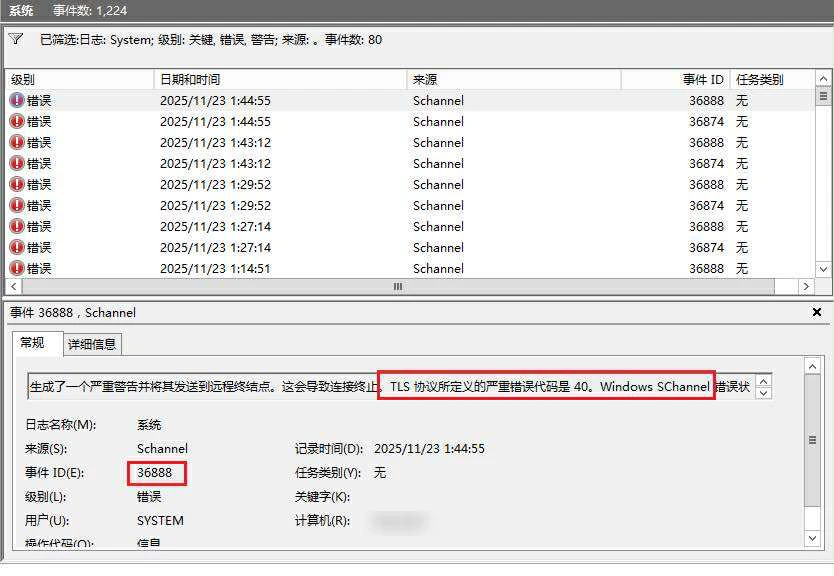
SQL connect issue:
TLS1.2 Error https://learn.microsoft.com/en-us/answers/questions/275585/tls-1-2-error-schannel-event-id-36874-and-36888